← Back to Games

Sphere Path Logic Challenge
Developer: League Veil Digital
Published: 2026-10-01
Updated: 2026-10-01
Loading Game Image...
Reviews
Sphere Path Logic Challenge is a physics-based puzzle game where players place bars and panels to guide a sphere to a goal. Its strength lies in the gradual difficulty curve and the clean, distraction-free presentation. The game suits players who enjoy patient, logical thinking rather than fast reflexes. However, the lack of a time limit or competitive elements may not appeal to those seeking action. The realistic 3D visuals and subtle audio feedback support concentration, making it a solid choice for fans of methodical puzzles.
Description
Core Objective and Tools
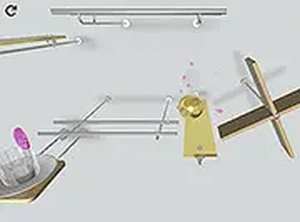
In Sphere Path Logic Challenge, the goal is to move a small sphere across a 3D board to a marked endpoint. You do this by placing two types of objects: rigid bars and transparent panels. Bars redirect or support the ball, while panels let it slide or bounce. Success depends on how well you anticipate the sphere's momentum and gravity. Every level is a self-contained problem that requires a unique arrangement of these objects. There is no time pressure, so you can think through each move carefully.Progression and Difficulty
The game organizes puzzles into a sequence that gradually increases in complexity. Early stages introduce basic concepts like straight paths and simple redirections. Later levels incorporate multiple objects, tighter spaces, and more intricate routes. This structure lets newcomers build confidence with fundamental mechanics before facing advanced challenges. The difficulty ramp is smooth, so players are not overwhelmed by a sudden jump in complexity. No two puzzles rely on the same solution pattern, which keeps the experience fresh as you progress.Visual and Audio Feedback
Realistic 3D graphics simulate materials like metal and glass. Lighting and shadows add depth to the board, making it easier to judge distances and angles. A soft background melody plays during gameplay, creating a relaxed mood. When the ball strikes an object, a xylophone-like tone sounds, providing clear audio feedback without being distracting. The overall presentation is clean and uncluttered, with no unnecessary animations or effects that might interfere with concentration.Controls and Interface
Players interact using a mouse or keyboard. Objects are selected from a palette and placed on the board with a simple drag-and-drop action. The interface is minimal, showing only essential information such as the current level number and a reset button. A full-screen mode is available for those who prefer an immersive view. The controls are responsive and precise, which is important for positioning objects accurately. No complex menus or tutorials are needed; the game lets players start solving immediately.Compatibility
✅ This game supports:
- Desktop browsers (Chrome, Edge, Safari)
- Mobile browsers (Chrome on Android, Safari on iOS)
❌ Does NOT support: - Internet Explorer - Very old browser versions
👉 Try refreshing or updating your browser
Faq
What is the main goal in Sphere Path Logic Challenge?
The goal is to guide a small sphere to a marked endpoint on a 3D board. You place rigid bars and transparent panels to redirect, support, or bounce the ball. Each level requires a unique arrangement of these objects, and success depends on understanding momentum and gravity.
What types of objects can I place?
You can place rigid bars and transparent panels. Bars can redirect or support the sphere, while panels allow it to slide or bounce. Each material has distinct physical properties that affect how the sphere moves, so you must choose the right tool for each section of the path.
Is Sphere Path Logic Challenge timed?
No, there is no time limit. The game rewards patience and logical thinking over speed. You can take as long as you need to plan and adjust your object placements. This makes it accessible to players who enjoy methodical problem-solving without pressure.
How does the difficulty progress?
The puzzles are organized into a sequence that gradually increases in complexity. Early stages introduce basic concepts like straight paths and simple redirections. Later levels incorporate multiple objects, tighter spaces, and more intricate routes. The smooth ramp ensures players are not overwhelmed by sudden jumps in difficulty.
What controls does the game use?
You can use a mouse or keyboard. Objects are selected from a palette and placed on the board with a simple drag-and-drop action. The interface is minimal, showing only the current level number and a reset button. A full-screen mode is also available for an immersive view.
Is there any audio feedback in the game?
Yes. A soft background melody plays during gameplay, creating a relaxed mood. When the ball strikes an object, a xylophone-like tone sounds, providing clear audio feedback without being distracting. This helps you track the sphere's interactions without needing to watch every moment.
Player Comments
Sign in to comment
You must be logged in before posting a review or rating.
No comments yet. Be the first to comment!










Editorial Notes