← Back to Games

Keyboard Star Typing Quest
Developer: Raven Core Games
Published: 2026-10-01
Updated: 2026-10-01
Loading Game Image...
Reviews
Keyboard Star Typing Quest keeps its scope narrow: single letters, moving targets, one keystroke each. That simplicity is its strength for children and absolute beginners, who can start without reading instructions. The gradual increase in target count and speed provides a natural difficulty curve, and the score gives a reason to replay. The main limitation is that it only practices individual key recognition, not full-word typing or posture. It works well as a short daily drill, not a complete typing curriculum.
Description
Target Practice on a Space Backdrop
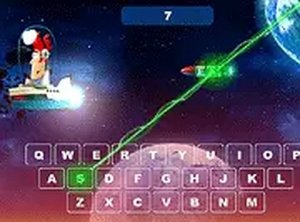
Keyboard Star Typing Quest turns keyboard drills into a simple arcade task. Letters ride on targets that drift toward a ship at the bottom of the screen. One keystroke per target clears it. Press the wrong key and the target stays put, so accuracy carries the same weight as speed. The space-themed background with stars and subtle effects keeps the screen calm rather than busy, which helps players keep their eyes on the letters. Full-screen mode removes browser clutter for longer practice sessions. [IMG_1]Progression That Grows With the Player
The game starts with a manageable number of targets and a comfortable pace. As play continues, more targets appear and they move faster. That curve matters because it prevents new typists from being overwhelmed while still pushing experienced players to react more quickly. The score tracker gives a concrete number to beat, which turns a repetitive drill into a personal challenge. Because each target requires only a single letter, even very young children can understand the goal without reading instructions. [IMG_2]Building Muscle Memory Through Repetition
Typing a single letter at a time may sound basic, but it directly targets keyboard layout familiarity. Repeated sessions help players associate each key with its position without looking down. Over time, that association becomes muscle memory, and reaction times shorten. Parents and teachers looking for a low-pressure way to reinforce keyboard skills can use the game as a short daily exercise. The absence of complex rules or timers beyond the moving targets keeps the focus on the keyboard itself.Access and Setup
Keyboard Star Typing Quest runs in a desktop web browser. There is nothing to download, install, or register for. Any standard keyboard works, and the game does not require a mouse. That low barrier means a player can open the page and start typing within seconds. The simple one-letter-per-target mechanic also makes it suitable for classrooms or homes where multiple children share a single computer. [IMG_3]✅ Compatibility & Testing
• Desktop (Windows 11, macOS Ventura)
• Mobile (iPhone 14, Samsung Galaxy S23)
• Tablet (iPad Pro, Android tablet)
✅Supported browsers: Chrome, Safari, Edge, Firefox (latest versions)
❌ Not supported: Internet Explorer, older browser versions
Faq
Does Keyboard Star Typing Quest work on tablets or phones?
The game is designed for desktop computers with a physical keyboard. It runs in a web browser and does not require a mouse, but touchscreen devices lack the physical keys the game is built around. For typing practice, a standard desktop or laptop keyboard is the intended input method.
Can I play Keyboard Star Typing Quest without creating an account?
Yes. The game requires no registration, download, or installation. You open it in a browser and start typing immediately. There is no login screen or profile to manage, which keeps the focus entirely on the typing exercise itself.
What age group is Keyboard Star Typing Quest suitable for?
The game is family-friendly and designed with children in mind. The one-letter-per-target mechanic is simple enough for very young players to grasp quickly. It is also useful for older beginners or anyone who wants to reinforce basic keyboard layout familiarity without a complicated interface.
How does the difficulty increase in Keyboard Star Typing Quest?
The game gradually adds more targets and increases their movement speed as play continues. This progression tests both speed and accuracy without overwhelming new players. The score tracker gives a clear measure of improvement, so repeated sessions naturally push players toward faster and more precise typing.
Does Keyboard Star Typing Quest track my progress or high scores?
The game tracks your score during play, which motivates players to beat their personal best. It does not mention saved profiles or long-term statistics. Each session is a fresh attempt, and the score provides immediate feedback on how well you performed in that round.
Is Keyboard Star Typing Quest a full typing course?
No. It is a focused practice tool for single-letter recognition and reaction speed. It helps build muscle memory for keyboard layout, but it does not teach full words, sentences, or touch-typing posture. It works best as a short, repeatable drill alongside other instruction.
Player Comments
Sign in to comment
You must be logged in before posting a review or rating.
No comments yet. Be the first to comment!




Editorial Notes