GTX Arcade Racing Challenge
Reviews
Description
Game Introduction
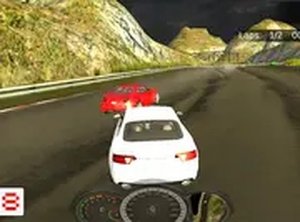
GTX Arcade Racing Challenge is a free-to-play racing game designed for desktop browsers. The core objective is to select a car, compete against computer-controlled opponents on various tracks, and finish races to earn in-game currency. What makes it unique is its straightforward, no-download approach, allowing players to jump directly into the action without any installation. The game focuses on steady progression, where each successful race brings you closer to upgrading your vehicle or purchasing a new one. With simple keyboard and mouse controls, it offers an accessible racing experience for players of all skill levels. The game emphasizes earning and spending currency wisely to improve performance over time.
How to Play
Players use their keyboard to steer and accelerate their car during races. The goal is to finish in first place against computer-controlled opponents on a variety of tracks. After each race, earnings are awarded based on performance. These earnings can be spent in the in-game shop on performance upgrades like engine, tires, and brakes. Players can also buy new cars or change their car's color for personalization. For a more immersive view, the game supports full screen mode. The controls are intuitive, making it easy for anyone to start racing quickly.
Game Features
Features include free-to-play access with no hidden costs, designed exclusively for desktop computers. Players can upgrade individual car parts to improve race times, choose from multiple cars with different performance stats, and customize their car's paint color. Full screen mode is available for a focused racing view. The game requires no downloads or installations, making it easy to start playing immediately. The in-game shop offers a variety of upgrades and customization options to enhance the racing experience.
Tips for Success
Focus on earning money by consistently finishing in first place. Prioritize upgrades that improve speed and handling, as these directly affect race performance. Experiment with different cars to find one that suits your driving style. Use the full screen mode to minimize distractions. Practice on each track to learn its layout and master the best racing lines. Save your earnings for higher-tier upgrades rather than spending on cosmetic items early on.
Compatibility
Faq
You May Also Like

Precision Archery 3D Arcade
Realistic archery with satisfying physics and competitive online matches. Great for skill-building.
Ball Drop Arcade Puzzle
A simple yet engaging ball drop puzzle with random platforms and increasing difficulty. Great for quick play sessions.
Immunity Guardian Arcade
A bright and fun arcade game that teaches quick reflexes while keeping the whole family entertained.
HueSpin Color Match Arcade
HueSpin offers a simple yet addictive color-matching challenge that tests reflexes and timing in short, fun sessions.

Marshmallow Stack Dash
A charming timing game with cute graphics and simple controls that is fun for all ages.
Cosmic Tile Smasher
A relaxing and addictive puzzle game with a beautiful space theme. Perfect for quick play sessions.
Truck Racing Adventure
A clean, family-friendly truck racing game with simple controls and scenic tracks. Great for quick fun.

Bubble Dash Adventure
A delightful endless runner with cheerful visuals and simple controls. Perfect for quick, fun sessions.

Colorful Anime Battle Arcade
A bright, family-friendly arcade game with charming characters and strategic timing. Perfect for all ages.
Melody Sketch: Rhythm Art Game
Melody Sketch uniquely blends music and drawing, offering a relaxing, family-friendly rhythm game that is easy to pick up and enjoy.