GTX Arcade Racing Challenge
Reviews
Description
Race Format and Objectives
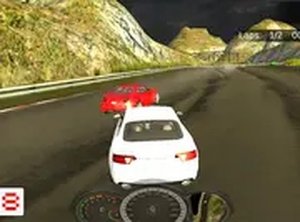
GTX Arcade Racing Challenge is a desktop-browser racing game built around short, repeatable races against computer-controlled opponents. You select a car, line up on one of several tracks, and aim to finish first. Placement determines your payout, so the gap between winning and merely finishing shapes how quickly your garage improves. Because the game runs entirely in a browser, there is no download or installation step between opening the page and starting a race.
Controls and Driving Feel
Steering and acceleration are handled with the keyboard, while the mouse covers menu navigation and shop interactions. That control scheme keeps the learning curve shallow: you can brake, turn, and accelerate without memorizing complex inputs. A full-screen mode is available, which removes browser clutter and keeps your attention on the road. The handling model leans toward accessible arcade behavior rather than simulation-grade physics.
Earning, Upgrading, and Buying Cars
Every race pays out in in-game currency based on your finishing position. That money feeds two systems. The first is performance upgrades: engine, tires, and brakes can each be improved, and those parts directly affect acceleration, grip, and stopping distance. The second is the showroom, where you can purchase additional cars with different performance stats. A paint-color option lets you personalize whichever car you own. The design pushes you to weigh short-term cosmetic spending against long-term speed gains.
Progression and Track Familiarity
Progress in GTX Arcade Racing Challenge is cumulative rather than level-gated. Strong finishes fund better parts, better parts produce faster lap times, and faster lap times make first-place finishes more consistent. Track knowledge matters too: each circuit has its own layout, so learning braking points and racing lines reduces the reliance on raw car performance. Players who enjoy tuning a vehicle over many sessions, rather than chasing a single story campaign, are the natural audience here.
Compatibility
Faq
Player Comments
Sign in to comment
You must be logged in before posting a review or rating.
No comments yet. Be the first to comment!





Editorial Notes